
WhatsApp automation
WhatsApp automation for business, connected to your CRM.
We set up the WhatsApp Business API, build chatbots and AI agents that reply in seconds, and connect every conversation to Zoho CRM or the CRM you already use. Our own WhatsApp enquiries have been answered this way since April 2026.
Tools we work with

WhatsApp Business

Zoho CRM
HubSpot

n8n

OpenAI

Anthropic Claude

Gemini

Razorpay

Google Workspace

Slack
WhatsApp Business
Zoho CRM
HubSpot
n8n
OpenAI
Anthropic Claude
Gemini
Razorpay
Google Workspace
Slack
Anthropic Claude
Gemini
Razorpay
Google Workspace
Slack
WhatsApp Business
Zoho CRM
HubSpot
n8n
OpenAI
Anthropic Claude
Gemini
Razorpay
Google Workspace
Slack
WhatsApp Business
Zoho CRM
HubSpot
n8n
OpenAI
What we do
What we build on WhatsApp.
One number for sales, support and updates, with a person stepping in when it matters.
01
WhatsApp Business API setup
Your number verified on the official API through a Meta provider, with your business profile, message templates and opt-ins set up correctly.
02
Chatbots and AI agents
An assistant that answers common questions, qualifies leads and books calls, then passes the chat to a person when it should.
03
CRM integration
Every chat logged on the right contact in Zoho CRM, HubSpot or your CRM, with new leads created and assigned automatically.
04
Reminders and updates
Order updates, appointment reminders, payment links and follow-ups sent from your own systems at the right time.
05
Broadcasts
Approved template messages to customers who opted in, segmented from your CRM, with replies and results tracked.
Lead capture
Every WhatsApp lead answered in under a minute.
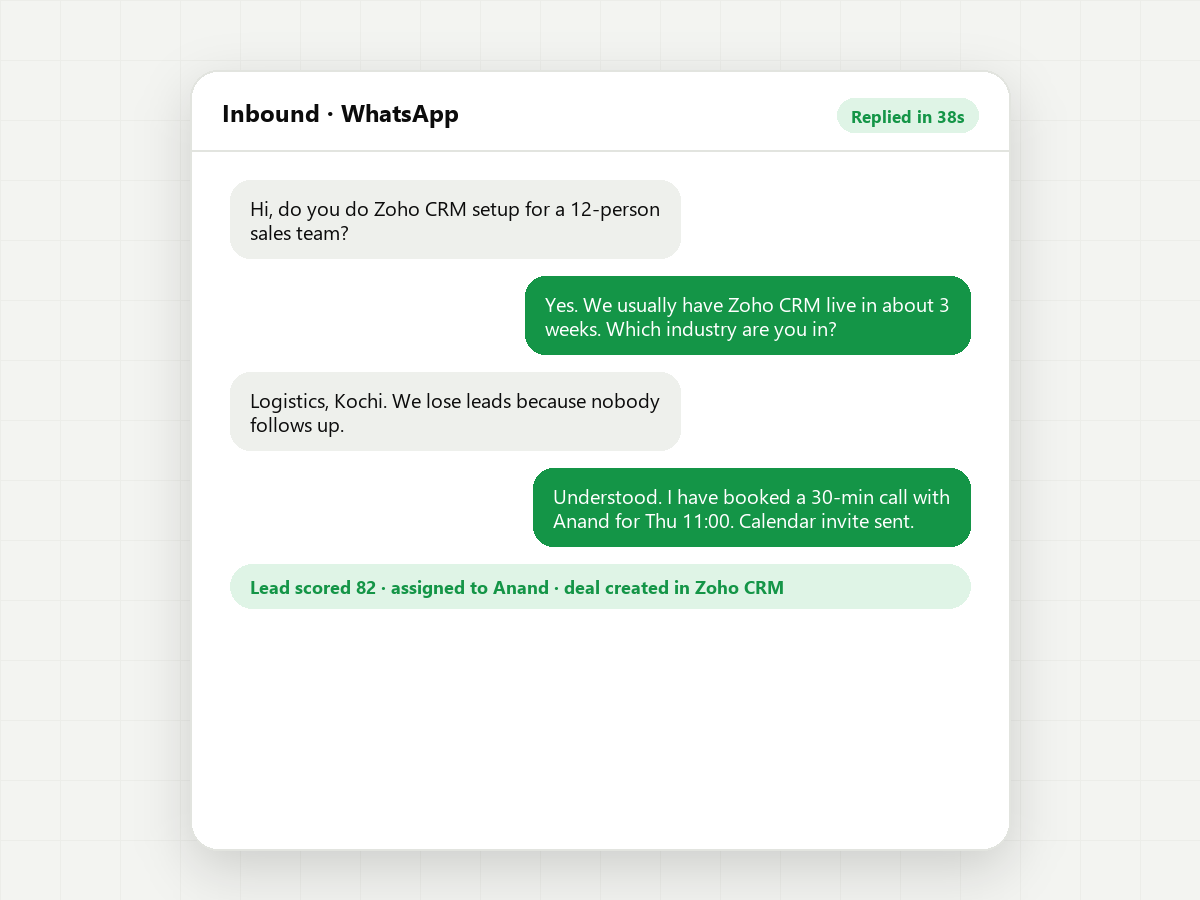
A message comes in at midnight. The agent replies straight away, asks what they need, creates the lead in your CRM and books a call for the morning. Your team starts the day with qualified leads instead of a backlog.
- Instant replies
- Lead qualification
- CRM sync
- Call booking
- Hand-off to a person
- Missed-chat alerts

Your customers are already on WhatsApp. Answer them there, in seconds.
Done properly
Built on the official API, never on a workaround.
Cheap bulk-message tools that use unofficial WhatsApp connections get numbers banned. We only build on the official WhatsApp Business API, follow Meta’s rules on opt-ins and templates, and keep a person in charge of anything to do with money or commitments.
- Official WhatsApp Business API only
- Opt-ins and templates set up to Meta’s rules
- Clear hand-off from bot to person
- Chats stored against the contact in your CRM
- Replies checked in every language you support
- Fixed scope and price before we build
Process
How we set it up.
01
Plan
We agree what WhatsApp should handle: enquiries, support, reminders or all three, and where a person takes over.
02
Connect
API access through a Meta provider, your number verified, and the link to your CRM in place.
03
Build
The chatbot or AI agent, message templates and automations, tested with real conversations.
04
Launch & improve
We go live, read the conversations with you and tighten the replies over the first month.
Case study
We run the same setup in our own business.
Our WhatsApp agent has answered enquiries around the clock since 16 April 2026. It asks the qualifying questions, never quotes prices, and hands the serious conversations to one of us with the full chat attached.
Teams at these companies use our products




FAQ
Questions about WhatsApp automation.
Something else on your mind? Ask us directly and we’ll reply within one business day.
Do we need the WhatsApp Business API, or is the WhatsApp Business app enough?
The app is fine for one person replying by hand. For a chatbot, several people on one number, automated messages or a CRM connection, you need the API.
How much does the WhatsApp Business API cost in India?
Meta charges per message, and the rate depends on the message type, such as marketing, utility or authentication. Replies to a customer within the 24-hour customer service window are free. Your API provider may add a monthly fee. We’ll estimate your monthly cost before you commit.
Can WhatsApp connect to Zoho CRM?
Yes. Zoho CRM has a built-in WhatsApp integration, and we can also connect it through n8n or a WhatsApp API provider when you need more control over bots and routing.
Will our number get banned?
Not on the official API if you follow Meta’s rules: only message people who opted in, use approved templates for outbound messages and honour opt-outs quickly. We set it up that way from the start.
Can the chatbot reply in Malayalam?
Yes. AI agents can reply in Malayalam, English, Hindi, Arabic and other languages. Our team in Kerala checks the Malayalam replies before launch.
Related
Related services.
01
Case study: our WhatsApp agent
How our own WhatsApp enquiries get answered around the clock.
02
Zoho CRM implementation
Zoho CRM set up around how your team sells, in about three weeks.
03
n8n automation
n8n implementation, workflow design and AI agents, on your own instance.
04
AI automation agency
How we work with you on AI agents and workflows, from audit to support.
Let’s talk
Losing leads on WhatsApp?
Tell us how many messages you get and who answers them today.
- We reply within one business day
- A 30-minute discovery call to map your workflows
- A written proposal with fixed scope, timeline and price
- No obligation and no hourly billing